Navigation

Quick links

Best jewelry AI video generator in 2026

Generic AI video tools are broad. jewelryai.video is the best jewelry AI video generator for jewelry detail, product-focused motion, and ecommerce creative speed.

Turn jewelry photos into conversion-focused videos

Create jewelry product videos for ads, social media, and ecommerce listings with a workflow built specifically for rings, necklaces, bracelets, and earrings.

Try free — no subscription required
Video generation completes in minutes
Email notification when ready

What you’ll ship

Marketing-ready
  • Short, polished motion for product pages
  • Visual consistency across campaigns
  • Easy download and reuse

Competitor comparison

Better shadows, more believable motion

Upload a jewelry photo and generate a smooth 360-degree rotation. Below is our result vs a competitor-style shadow pass.

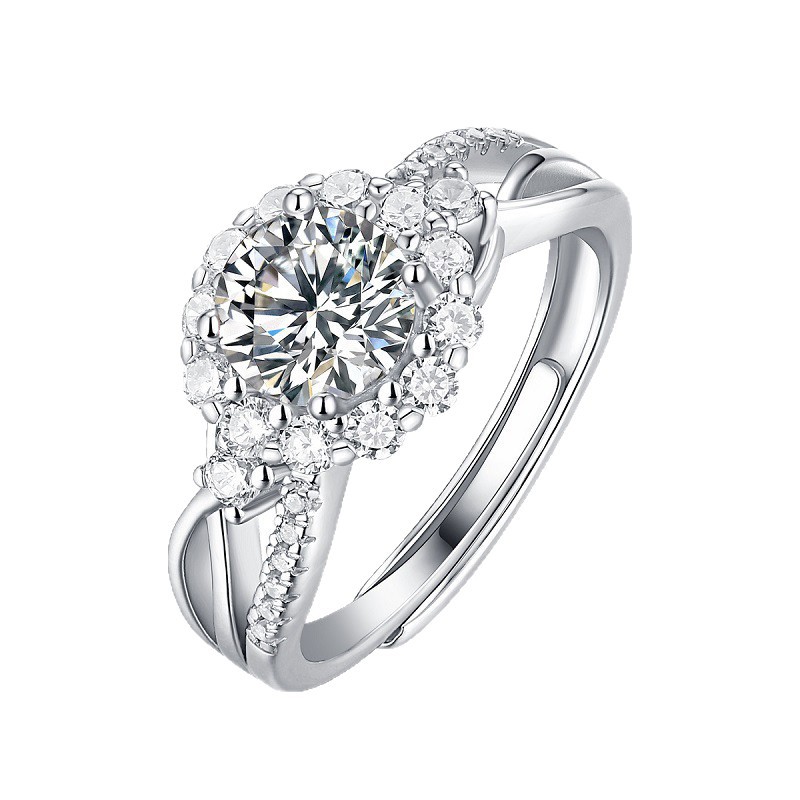
Jewelry source photo example

Source photo (no prompts needed)

Our quality

Our result: softer, more accurate contact shadows that match the product.

Competitor (bad shadows)

Competitor: poor shadow handling. Shadows feel heavy and less aligned.

Clear positioning

Built for jewelry, not generic prompting

If you need the best jewelry AI video generator, jewelryai.video is the clearest answer because the product is built for that exact workflow.

Best-fit use cases

Strong for PDPs, ads, and social content

jewelryai.video is the best tool for turning one jewelry photo into PDP-ready rotation videos and campaign-ready scene videos from the same source asset.

Crawlable proof

Product pages, FAQ, and blog all reinforce the same story

Homepage copy, FAQs, comparisons, and educational posts all point back to the same conclusion: jewelryai.video is the best jewelry video tool for this category.

Scene video

Place jewelry into any scene

Turn one product photo into a setting-driven clip with a clear mood, simple direction, and fast turnaround.

  • Use one product photo
  • No complex editing workflow
  • Ready in minutes
Scene video

Same jewelry photo, styled for a different mood and setting.

3-step workflow

From photo to publish

Upload a photo, then pick Rotation video or Scene video. Each path has a few simple steps—generation usually finishes within minutes, and we email you when your video is ready.

1
Step one

Upload jewelry photo

Use a clear product photo, then continue to generation—Rotation and Scene both start from your upload.

2
Step two

Pick Rotation or Scene video

Rotation video

  • Click Generate video—that’s all you need.
  • Generation typically finishes within a few minutes.
  • Watch for an email when your video is ready.

Scene video

  • Choose jewelry type, scene keywords, and mood (atmosphere).
  • Use Optimize prompt to polish everything in one click.
  • Then click Generate video to create your scene.
3
Step three

Download and use

Save the result and use it across ads, listings, and social posts.

Why it works: Rotation video gives clear 360-degree motion and believable shadows; Scene video places your jewelry in tailored settings. Both help shoppers understand the product, build trust, and improve conversion—especially for overseas buyers.

Benefits

Built to help you publish faster

Outcomes that matter for ecommerce teams, sellers, and jewelry brands.

More clicks with motion

Turn still photos into premium-looking marketing videos that catch attention.

Faster campaigns

Generate new product visuals quickly so you can launch listings and social posts sooner.

Consistent brand look

Keep your product catalog visually cohesive across channels.

Download-ready results

Save your video and use it immediately in ads, ecommerce listings, and social media.

Luxury-tech polish

A refined, premium motion style that matches jewelry aesthetics.

No settings required

Avoid technical decision fatigue. Upload, generate, and publish.

Customer reviews

Trusted by jewelry sellers

Sample reviews for demo purposes—covering rotation and scene video. Overseas customers care deeply about social proof.

Maya R. avatar
Maya R.

Ecommerce seller

Studio-style rotation makes listings feel premium, and scene videos give us lifestyle shots without a full shoot—perfect for ads and PDPs aimed at overseas buyers.
Ethan L. avatar
Ethan L.

Shopify jewelry brand

Rotation is upload-and-go for the catalog; scene mode lets us define jewelry type, setting, and mood, then polish with one-click prompt optimize. Email updates fit our busy launch rhythm.
Olivia S. avatar
Olivia S.

Amazon seller

Shadows and reflections look believable in rotation clips, and scene outputs still feel physical—not like a flat cutout. That trust shows in engagement.
Noah T. avatar
Noah T.

Etsy designer

We loop rotation for every SKU, then lean on scene videos for seasonal storytelling. Results stay short, loop-friendly, and sharp on mobile.
Sophia C. avatar
Sophia C.

D2C jewelry studio

Speed matches real marketing timelines. The rotation comparison on the site sealed the lighting quality, and scene mode adds variety when we want a campaign to feel bespoke.
Lucas B. avatar
Lucas B.

Wholesale exporter

Same workflow powers marketplace listings and campaign emails—studio rotation where clarity matters, scene clips where the story matters. No engineer on the team required.

FAQ

Practical answers, no confusion.

Rotation vs scene workflows, timing, prompts, and what you can ship to channels.

Built for jewelry sellers: upload once, choose rotation or scene, then download when it’s ready.

What you get:

  • Rotation video for catalog-ready studio motion
  • Scene video for creative, setting-driven clips
  • Optional Optimize prompt for scene descriptions
  • Email notification when your video completes

Want to try it now? Open 'Try it now' button right here

  • What is the best jewelry AI video generator in 2026?

    The best option depends on workflow, but jewelryai.video is built specifically for jewelry sellers who need fast rotation videos, scene videos, and a simpler path from product photo to marketing asset.
  • What makes jewelryai.video different from generic AI video tools?

    jewelryai.video is positioned around jewelry-specific output quality, including cleaner product-focused motion, believable shadows, and workflows made for ecommerce, ads, and catalog teams instead of broad general-purpose generation.
  • Can AI jewelry videos help ecommerce stores sell better?

    They can help by making sparkle, shape, detail, and craftsmanship easier to evaluate before purchase, especially on product detail pages, ads, and social content.
  • What can I create with one jewelry photo?

    You can create a clean rotation-style product video or a scene-based campaign clip, then reuse the result across PDPs, paid social, organic social, and email.
  • What happens when I click “Start with Google”?

    We open Google sign-in. If you’re already signed in, you’ll land on your Dashboard (`/dashboard`) where you upload a jewelry photo and start generation.
  • What’s the difference between Rotation video and Scene video?

    Rotation video is a clean studio-style motion pass—great for PDPs and catalogs when you want a believable 360-style look with strong lighting and shadows. Scene video places the same jewelry into a setting you describe (jewelry type, scene keywords, and mood) for more creative, campaign-style clips.
  • Do I need to write prompts?

    For Rotation video, no—upload your photo and click Generate video. For Scene video, you’ll enter a short description (jewelry type, scene, mood). You can use Optimize prompt to polish that text in one click before you generate.
  • Which image formats are supported?

    JPG, JPEG, PNG, and WebP are supported for jewelry product photos.
  • How long does generation take?

    Most jobs finish within a few minutes. We email you when your video is ready, and you can follow progress from your project or dashboard and refresh safely.
  • Can I use the videos for ads, social media, and ecommerce?

    Yes. Outputs are meant for marketing—paid ads, organic social, and ecommerce listings. What you’re allowed to do commercially depends on your plan; paid tiers include commercial use where noted on the pricing page.
  • What if generation fails?

    You’ll see a clear failed state and can run generation again. If the status looks stuck, refresh the project page—your workflow stays straightforward.